FAQs
Kaleido Sniper “Sealed” (V2 / S-Type) Roasters
Q: What is the “Sealed” (V2 or S-Type) Kaleido Sniper roaster?
A: The “Sealed” version refers to the updated V2 design introduced in 2023. It features improved heat efficiency and more precise airflow control, resulting in better roasting consistency, energy use, and overall performance compared to the original V1 models.
Q: How is V2 different from the older V1 version?
A: V2 (Sealed) roasters are engineered with a more enclosed system that minimizes heat loss and optimizes airflow. This allows for:
- More stable roasting temperatures
- Greater control over roast profiles
- Improved repeatability
- Enhanced energy efficiency
Q: What does “S-Type” mean?
A: “S-Type” is simply another name used by some retailers to refer to the Sealed (V2) version. It’s not a different model—just a labeling distinction during the transition period from V1 to V2.
Q: Which models come in the Sealed (V2) version?
A: The Sealed (V2) design is now standard for all current Kaleido Sniper models, including:
- M1
- M2
- M6
- M10
Q: Which version do you sell?
A: We only sell the latest Sealed (V2) versions. This ensures you receive the most advanced design with the best performance and reliability available.
Q: Should I specifically request V2 when ordering?
A: No—every unit we sell is already the Sealed (V2) version, so you can order with confidence.
Do you have a showroom?
At this time, Kaleido Roasters Canada does not operate a public showroom. All orders are fulfilled online and shipped directly to customers. For product questions, demos, or support, please contact our team—we’re happy to help.
Safety & Certification
At Kaleido Roasters, we prioritize equipment safety and technical transparency. Our roasters are designed and manufactured for consistent performance in both home and commercial environments.
–Compliance & Certifications
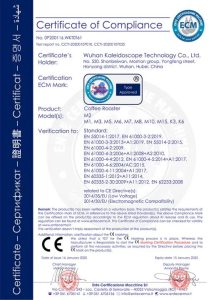
Our equipment carries international CE, FCC, RoHS marking and is designed in compliance with applicable European safety requirements, including the Low Voltage Directive (2014/35/EU) and the EMC Directive (2014/30/EU).
The equipment is not certified or approved under CSA, UL, ETL, or equivalent regional certification schemes unless explicitly stated.
Any additional certification requirements depend on the jurisdiction in which the equipment is installed or used.
Patented Technology
Our carbon fiber infrared heating system incorporates protected utility model patented technology.
Electrical Performance Testing
Each unit undergoes electrical and electromagnetic compatibility (EMC) testing to verify operational stability and reduce interference with surrounding devices.
Canadian Compliance & Field Evaluation
In Canada, electrical equipment may be subject to provincial or local safety requirements depending on installation and use.
Where required by local authorities, compliance may be achieved through a recognized field evaluation or inspection process conducted by an accredited authority in accordance with applicable electrical safety standards (including SPE-1000 or equivalent provincial requirements).
The customer is responsible for ensuring that the equipment complies with all applicable local laws, regulations, and safety requirements prior to installation or use. This includes any requirement for inspection, field evaluation, certification, or approval by local authorities or third-party agencies.
Any costs associated with such requirements, including inspection or certification fees, are the responsibility of the customer unless explicitly agreed in writing at the time of purchase.
Regulatory Responsibility
Kaleido Roasters Canada does not represent equipment as CSA certified unless explicitly stated.
Customers are responsible for ensuring compliance with all applicable local regulatory requirements prior to installation or operation.
MacBook Air & Artisan Software Compatibility
We have seen a number of connectivity issues reported when running Artisan Coffee Roasting Software on certain models of MacBook Air.
Important Clarification
This is not a Kaleido hardware issue.
The connectivity challenges are related specifically to Artisan software compatibility on some newer MacBook Air models, particularly when connecting via Bluetooth or USB communication.
Our Recommendation
If you are using a MacBook Air, we strongly recommend:
- Using an alternative laptop (Windows PC preferred) when running Artisan
- Ensuring all drivers and USB configurations are properly installed
- Avoiding reliance on Bluetooth connections where possible
Kaleido roasters are fully tested and operational with supported systems. If you experience connection instability while using Artisan on a MacBook Air, the issue is software-side and unrelated to the Kaleido machine itself.
If you need help choosing a compatible setup, please contact our support team — we’re happy to assist.
Shipping & Order Tracking Information
Pricing & Duties
Prices exclude local import duties and taxes, which apply upon delivery.
Testing & Commissioning
Each Kaleido roaster is individually tested and commissioned before shipping to ensure it arrives fully functional and ready to use. This process typically takes 3–5 business days.
Shipping Time
Once testing is complete, typical delivery time is 10–15 business days, depending on destination and current logistics conditions.
Where Is My Order?
Shipping confirmation is sent only after your order has been fulfilled. To monitor your order status, please ensure you enter the correct email address and phone number at checkout.
Important Shipping Notes
To help manage customs duties, we typically use air freight, with final delivery handled by UPS or DHL. Tracking may not be available until the package clears customs.
A physical address and phone number are required to avoid delivery issues.
For rural or remote locations, please allow an additional 7–10 business days.
Once an order has shipped, it cannot be redirected by us. You may contact UPS or DHL directly to request a redirect, subject to carrier approval.
Please review your shipping address, phone number, and email carefully before placing your order.
If you do not receive your package within the expected timeframe, please contact us. All delivery estimates are calculated in business days and do not include weekends.
Receiving Your Roaster – Heating Elements Not Working
In rare cases, the heating elements may not function after delivery due to vibration during logistics transportation. This can occur in the following situations:
Heating element damage
Vibration during transit may cause the glass tube of the heating element to crack or break, preventing the heating element from operating.
Heating wire damage
Vibration during transportation may also cause the internal heating wire to break. In this case, the heating element may fail immediately or after a few initial uses of the machine.
If you experience a heating issue upon receiving your roaster or during initial use, please stop operating the machine and contact us immediately so we can assist with inspection, troubleshooting, and next steps.
Electrical Requirements
The Kaleido M6 and M10 Coffee Roasters require a dedicated, single-use circuit with no additional loads connected.
110V Configuration
- Outlet: 20A rated receptacle
- Circuit Breaker: Minimum 2-pole (2P), 20A
- Circuit: Dedicated, properly grounded, and sized according to local electrical codes
220–240V Configuration
• Factory-Installed Plug: NEMA L6-20P
• Required Outlet: NEMA L6-20R (20A, 250V locking receptacle)
• Circuit Breaker: Minimum 2-pole (2P), 20A
• Circuit Type: Dedicated, grounded, correctly sized wiring
Estimated Import Fees
Import fees vary by country and local customs regulations. However, based on typical customer feedback, here are the estimated import costs for each Kaleido Sniper model:
| Model | Estimated Import Fee (CAD) |
|---|---|
| Kaleido M1/M2 Lite | $0 |
| Kaleido M1 Sniper | $75–$125 |
| Kaleido M2 Sniper | $75–$125 |
| Kaleido M6/M10 Sniper | $100–$150 |
|
Kaleido Air Cleaner Pro |
$100–$150 |
Note: These are estimated ranges. Actual import duties, taxes, and fees may vary depending on your country’s regulations. We recommend checking with your local customs office for the most accurate information.
Warranty Claims
All Kaleido roasters include a 1-year manufacturer’s warranty, covering defects in materials or workmanship under normal use.
Using the roaster for any purpose other than its intended use will void the warranty.
Warranties are non-transferable. If the roaster is resold, the warranty is void.
If your roaster fails prematurely during normal use, please contact us directly to begin the warranty claim process
Return & Refund Policy
The roaster must be returned in its original packaging, including the original crate, foam, and all internal supports. No exceptions will be made—proper packaging is required.
We do not offer a satisfaction guarantee on merchandise or coffee products. Please read all product descriptions carefully and make purchases in good faith—we strive to provide honest and detailed information.
We accept returns on unused roasters purchased directly from www.kaleidoroasters.ca within 14 days of delivery. Returns are subject to a 15% restocking fee.
Important: Roasters purchased through Amazon or other third-party resellers are not covered by this policy. Please contact the original seller for support.
You are responsible for the cost of shipping the roaster back to our factory.
The roaster must be returned in its original packaging, including the original crate, foam, and all internal supports. No exceptions will be made—proper packaging is required to ensure safe transport and prevent damage during return shipping.
All returned units must be received in unused condition and are subject to inspection before a refund is approved.
- If you’re unsure about a product, we encourage you to email or call us with any questions before purchasing.
- Please avoid purchasing items with the intent to return them. As a small business, frequent returns are difficult to absorb.
- That said, we’re here to help. If you’re unhappy with an item, reach out to us—many issues can be resolved with proper guidance or usage tips.
Shipping Damage & Order Issues
Please inspect your package immediately upon delivery. If your order arrives damaged or contains incorrect items, we’re here to help.
- Report any damage or shipping errors by emailing sales@kaleidoroasters.ca as soon as possible.
- Be sure to include clear photos of the packaging and the affected items.
- All damage must be reported within 14 days (2 weeks) of delivery to qualify for a replacement or resolution.
Prompt communication helps us resolve issues quickly and ensures you receive the product you ordered in perfect condition.
Do Kaleido Roasters Produce a Lot of Smoke?
Kaleido Roasters feature a built-in smoke extraction system that effectively absorbs most of the smoke generated during roasting. For most users, this system is sufficient—especially when roasting lighter profiles or smaller batches.
However, as roast volume increases or if you’re roasting to darker levels, the amount of smoke can rise accordingly.
-
For example, if you’re using a Kaleido M10 and regularly roasting 500g or more, or prefer dark roasts, we strongly recommend using an exhaust pipe or additional ventilation.
This will help manage excess smoke, keeping your roasting environment safe, comfortable, and disruption-free
Recommended Venting Duct Sizes
Proper ventilation is crucial for safe and efficient roasting. Below are the suggested venting duct sizes for each Kaleido Sniper model:
| Model | Recommended Duct Size (mm) | Recommended Duct Size (inch) |
|---|---|---|
| Kaleido M1 Sniper | 25 mm | 1 |
| Kaleido M2 Sniper | 32 mm | 1 1/4 |
| Kaleido M6 Sniper | 32 mm | 1 1/4 |
| Kaleido M10 Sniper | 45 mm | 1 3/4 |
Note: For best performance and safety, always use heat-resistant, flexible ducting rated for roasting exhaust systems. Ensure the duct is as short and straight as possible to minimize airflow resistance.

Standard Version
Kaleido System
Operation: Kaleido Touch Panel
USB connection
Manual & Automatic Roasting Modes
Copy, modify, and share roasting profiles & ROR

Pro Version
Artisan System
Operation: on PC / Windows Tablet
Manual & Automatic Roasting Modes
Copy, modify, and share roasting profiles & ROR

Dual System Version
Kaleido + Artisan System
Operation: Kaleido Touch Panel / PC
Kaleido System: USB Connection
Artisan System: Bluetooth Connection
Manual & Automatic Roasting Modes
Copy, modify, and share roasting profiles & ROR
How long does Kaleido Roaster needs to cool between roasts?
The Kaleido Roaster does not need to be cooled between roasts. On the contrary, after finishing all roastings, please make the drum stir and cool until the air temperature drops below 50°C.